Get in touch

Software studio · Europe, South Africa, Australia, New Zealand

Business software that fits the question you are asking.

Project management, ERP, SAP Business One integrations, dashboards and AI automation, built for small and mid-size teams that need it working next month, not next year.

The answer is only useful if it fits the question.

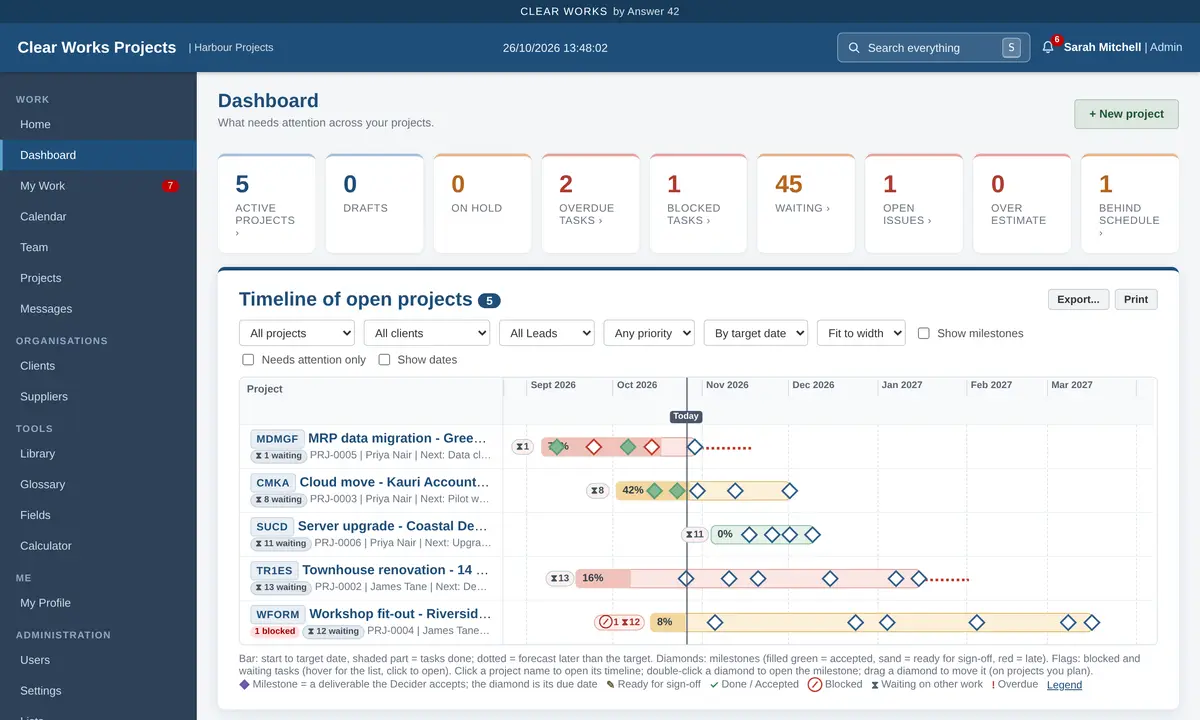
Clear Works dashboard: six active projects with health colours, overdue and blocked tasks, and a timeline of all projects
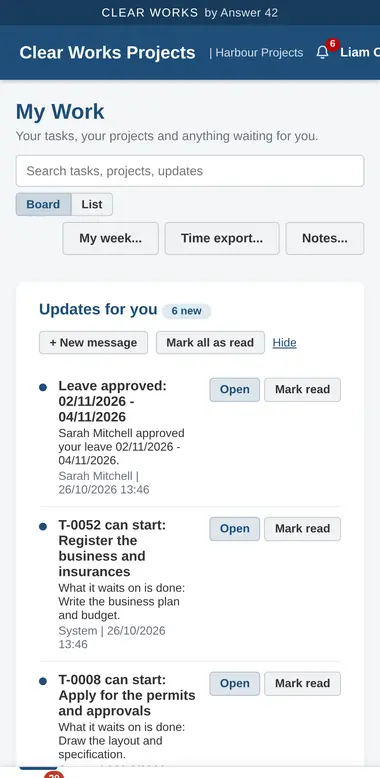
Clear Works on a phone: My Work with updates and tasks to accept

The Clear family

Six products that solve one problem each, work with the tools you already have, and go live without a migration project.

Clear Works

Early access

Projects and resources

Project management for small teams, running in your own Google account. Your data stays in your own Google Sheet.

  • Milestones the client signs off, Gantt timeline, critical path
  • Team availability, leave approval, workload
  • Time tracking, risks, changes, weekly status reports
Learn more →

Clear ERP

Manufacturing and stock

Resource planning for small to mid-size manufacturers and distributors.

  • Bills of materials and production orders
  • Inventory and stock control
  • Suppliers and purchasing
Learn more →

Clear Way

Integrations and add-ons

Connect the systems you run on, so data is entered once and moves by itself.

  • SAP Business One add-ons and integrations
  • Esker document and order automation
  • REST APIs, webhooks, Google Workspace, Excel
Learn more →

Clear Views

Dashboards and reporting

Power BI dashboards on your own data, built around the questions your managers ask every week.

  • Sales, margin and customers
  • Stock, production and purchasing
  • Finance and cash flow
Learn more →

Clear Flow

AI automation

Workflow automation and AI-assisted tools that join up the systems you already use.

  • Document reading and data extraction
  • Process triggers and automatic follow-ups
  • AI-assisted decision support
Learn more →

Clear Lens

Browser extensions

Chrome extensions for the everyday jobs your team does in the browser.

  • PDF, developer and unit tools that never upload your files
  • Smart home control and API testing
  • Live weather, exchange rates and price alerts
See the extensions →

Clear Works · early access

Every project, person and deadline on one screen

Built on PMBOK good practice without the jargon. Clear Works runs in your Google account, so there is nothing to install and your data never leaves your own Drive.

Your data, your DriveRuns on Google Sheets in your own account
Client sign-offMilestones with agreed acceptance tests
Import in minutesFrom Excel and MS Project, export to both
Works on a phoneAccept tasks, log time, approve on the go

Clear Lens · browser extensions

Small tools that live in your browser

Chrome extensions we build for our own work and for clients. The ones below are free, shown as examples of what we make.

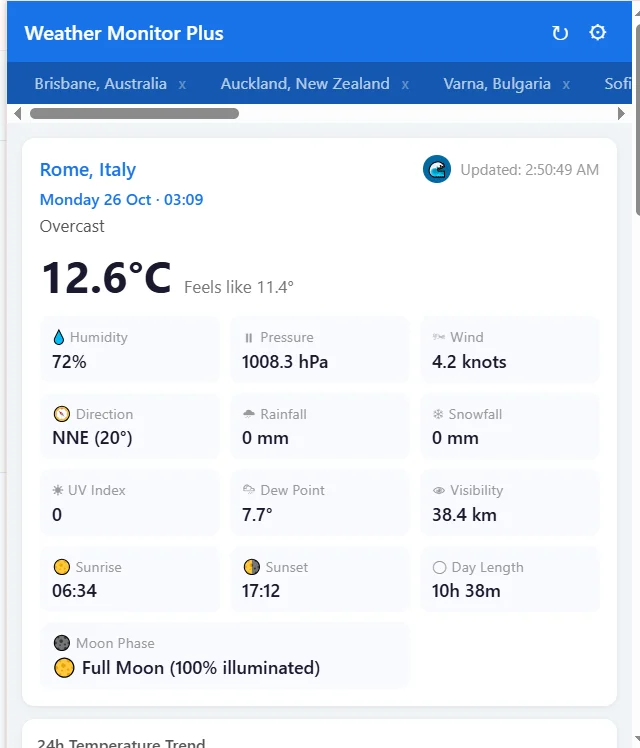
Weather Monitor Plus: current weather for Rome with temperature, humidity, pressure, wind in knots, UV, sunrise, sunset and moon phase, with tabs for other cities
Weather for each saved place
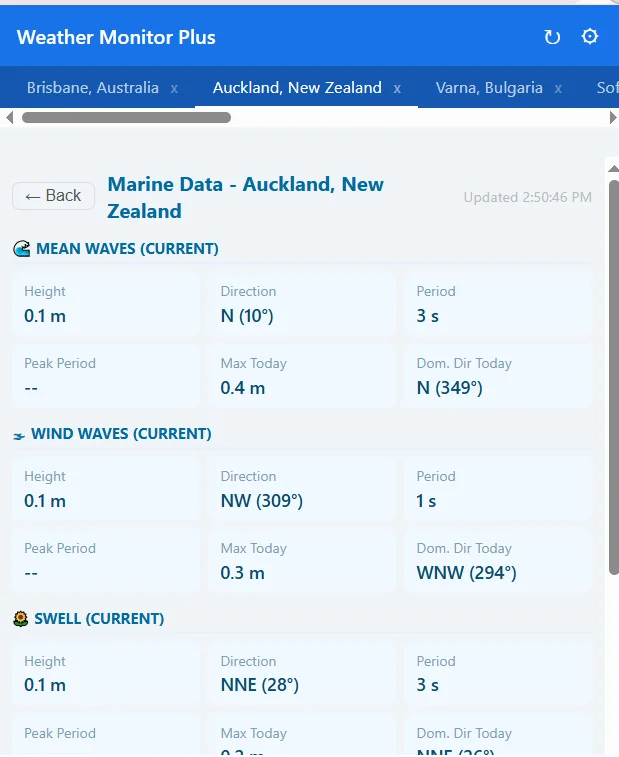
Weather Monitor Plus marine view for Auckland: wave, wind wave and swell height, direction and period
Marine view: waves and swell
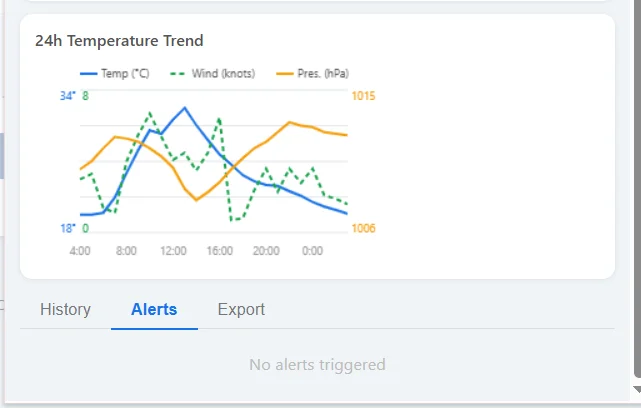
Weather Monitor Plus 24-hour chart of temperature, wind and pressure, with History, Alerts and Export tabs
24-hour trend, history, alerts and export
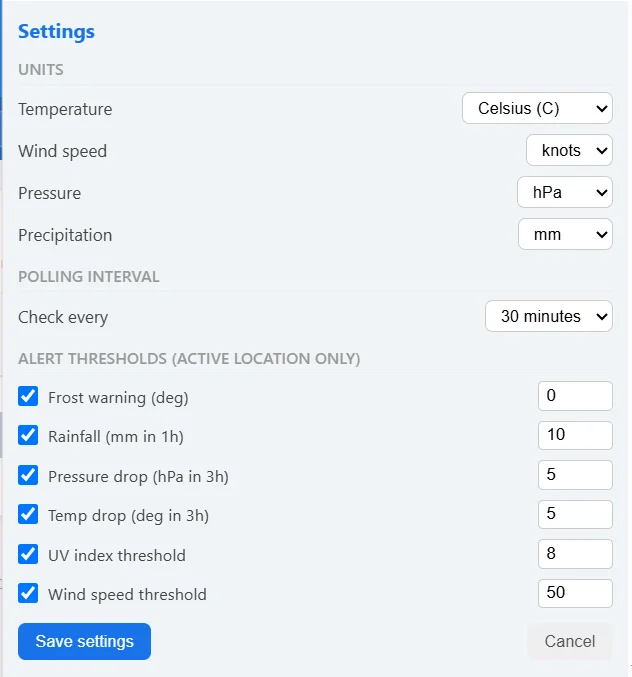
Weather Monitor Plus settings: units, check interval and alert thresholds for frost, rainfall, pressure drop, temperature drop, UV index and wind speed
Your units and alert thresholds

Weather Monitor Plus

Free version available

Weather and sea conditions for every place you care about, one click away in Chrome. Keep several locations in tabs, or use your current location.

  • Temperature and feels-like, wind in knots and direction, pressure, rain, UV and visibility
  • Sunrise, sunset, day length, moon phase and a 24-hour trend
  • Marine view: waves, wind waves, swell, sea temperature, currents and tides
  • Alerts for frost, heavy rain, a falling barometer, a sudden temperature drop, high UV and strong wind, each with your own threshold
  • Your own units for temperature, wind, pressure and rain, a check interval you choose, history and export

It connects only to the Open-Meteo weather service and needs no account. For planning only, not for navigation.

Weather data by Open-Meteo.com, licensed CC BY 4.0.

Ask us about it
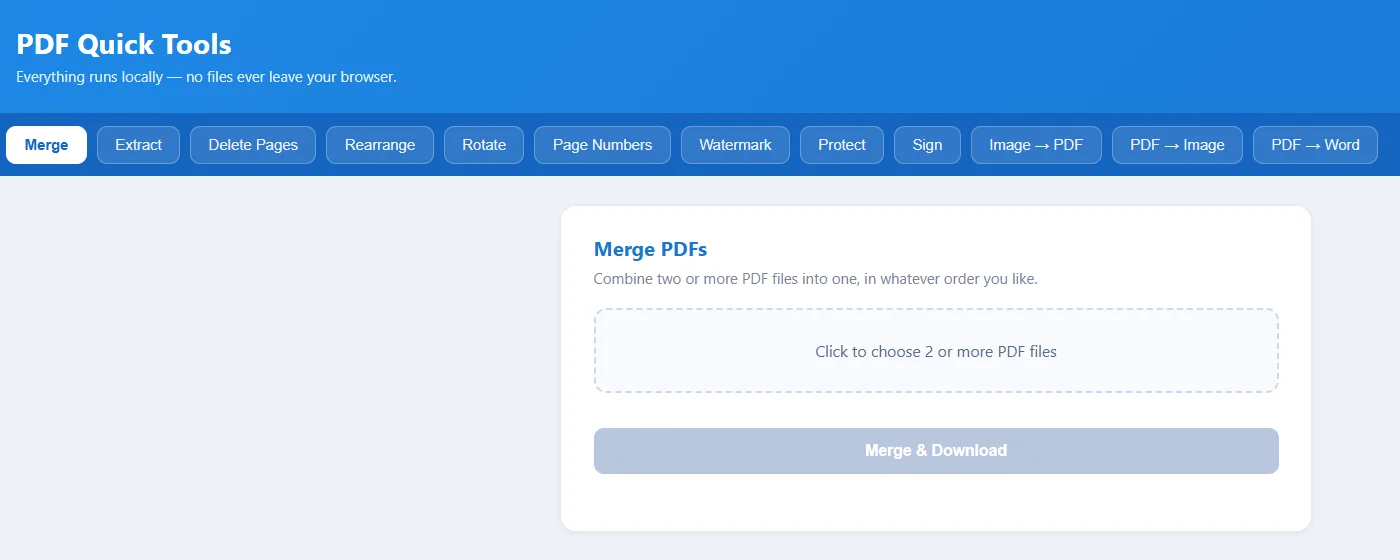
PDF Quick Tools: tool bar with Merge, Extract, Delete Pages, Rearrange, Rotate, Page Numbers, Watermark, Protect, Sign, Image to PDF, PDF to Image and PDF to Word, and the Merge PDFs screen

PDF Quick Tools

Free version available

Everyday PDF jobs without uploading your files to a website. Merge, extract, delete or rearrange pages, rotate, add page numbers or a watermark, protect with a password, sign, and convert between PDF, images and Word.

Everything runs inside your browser, so contracts, invoices and payslips stay on your computer.

Ask us about it
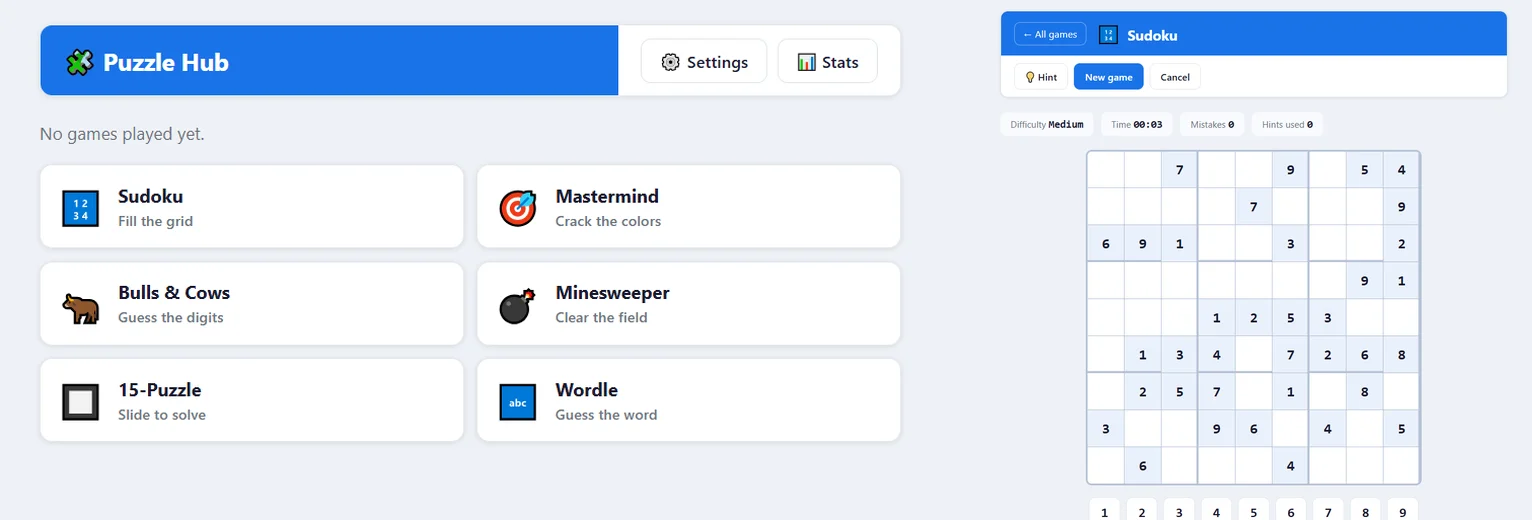
Puzzle Hub: the game list with Sudoku, Mastermind, Bulls and Cows, Minesweeper, 15-Puzzle and Wordle, and a Sudoku game with Hint, timer, mistakes and hints used

Puzzle Hub

Free version available

Six classic puzzles in one extension: Sudoku, Mastermind, Bulls & Cows, Minesweeper, the 15‑Puzzle and Wordle. Good for a short break between meetings.

  • Set the level for each game: Sudoku clues, Mastermind colours, code length, Minesweeper board, shuffle and word set
  • Sudoku with hints, a timer and a mistakes count
  • Your own stats across all the games
  • A separate Sudoku solver: type in a puzzle from a newspaper or a book and press Solve

No account needed. The only permission it asks for is to keep your settings and stats.

Ask us about it
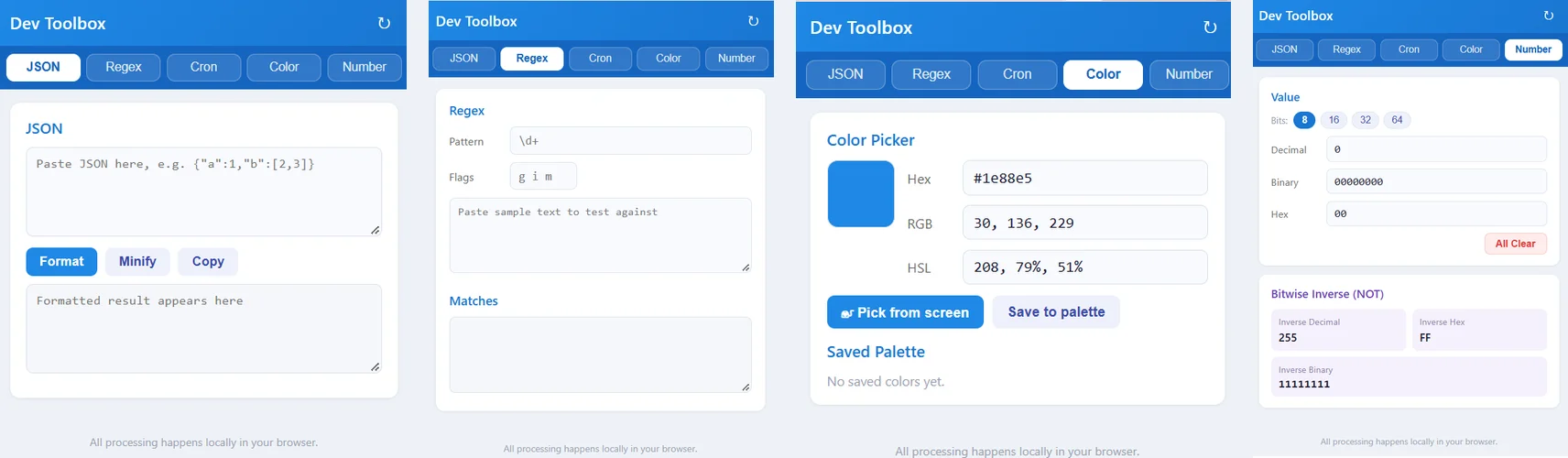
Dev Toolbox: the JSON, Regex, Color and Number tabs

Dev Toolbox

Free version available

The small tools a developer reaches for every day, one click away in the browser bar.

  • JSON: format, minify and copy
  • Regex: try a pattern and its flags on sample text and see the matches
  • Cron: a schedule line explained in plain words
  • Color: pick a colour from the screen, see it as Hex, RGB and HSL, keep a palette
  • Number: decimal, binary and hex side by side at 8, 16, 32 or 64 bits, with the bitwise inverse

Everything runs inside your browser. The only permission it asks for is to keep your settings and palette.

Ask us about it
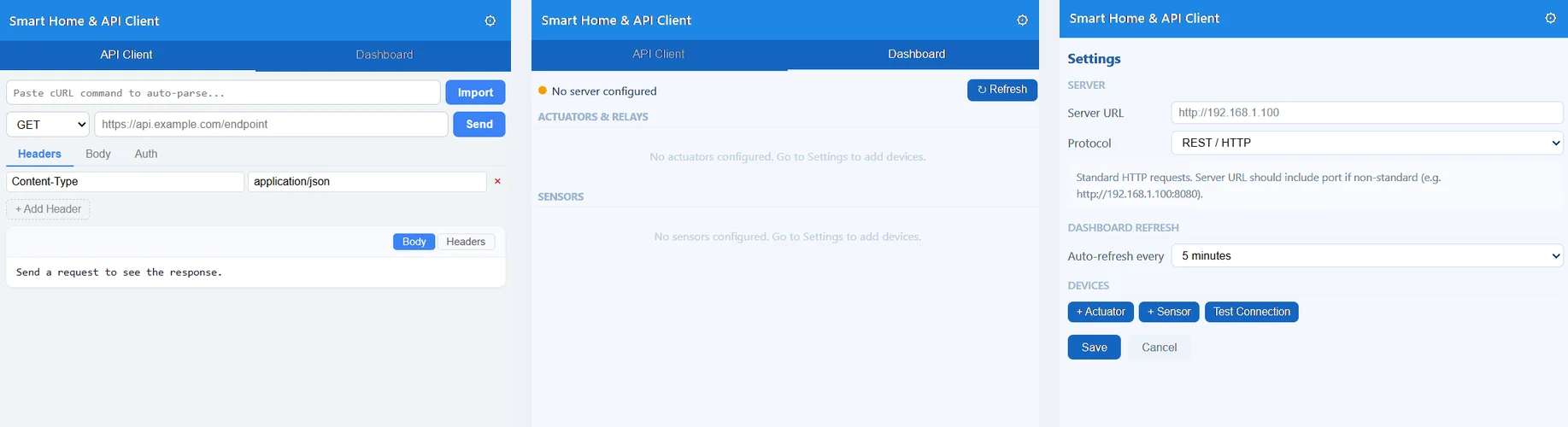
Smart Home and API Client: the API Client tab, the Dashboard with actuators, relays and sensors, and Settings with server address, protocol, auto-refresh and devices

Smart Home & API Client

Free version available

Test web APIs and keep an eye on the smart devices on your own network, from one popup.

  • API client: method and address, headers, body and sign-in details, and the response with its headers
  • Paste a cURL command and it fills in the request for you
  • Dashboard: switch actuators and relays and read your sensors, refreshed on a schedule you choose
  • Talks to your devices over REST / HTTP, WebSocket, MQTT, Modbus TCP or CoAP, with Test Connection to check the link

It asks for access to all websites because it sends requests to whatever address you type in, including devices on your own network.

Ask us about it
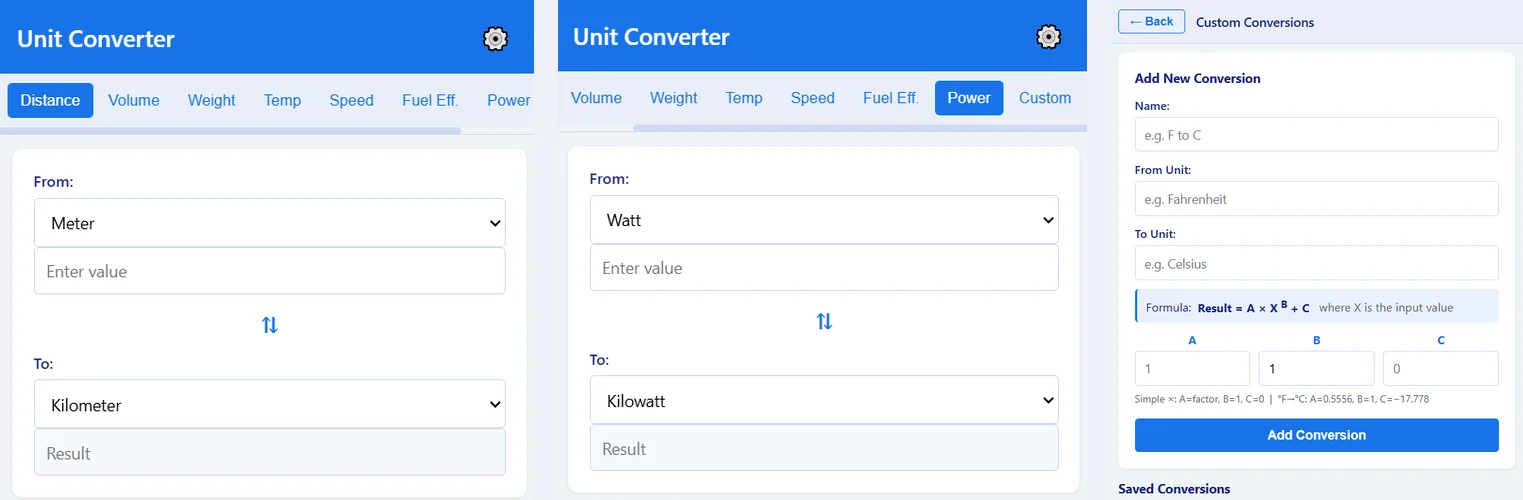
Unit Converter Pro: converting metres to kilometres and watts to kilowatts, and the screen for adding your own conversion with the formula Result = A times X to the power B plus C

Unit Converter Pro

Free version available

Quick conversions without searching the web: pick the units, type a value, and swap the direction with one click.

  • Distance, volume, weight, temperature, speed, fuel efficiency and power
  • Your own conversions: give a name and the two units, and set the formula Result = A × XB + C
  • Your saved conversions sit in their own Custom tab

Everything runs inside your browser. The only permission it asks for is to keep your own conversions.

Ask us about it
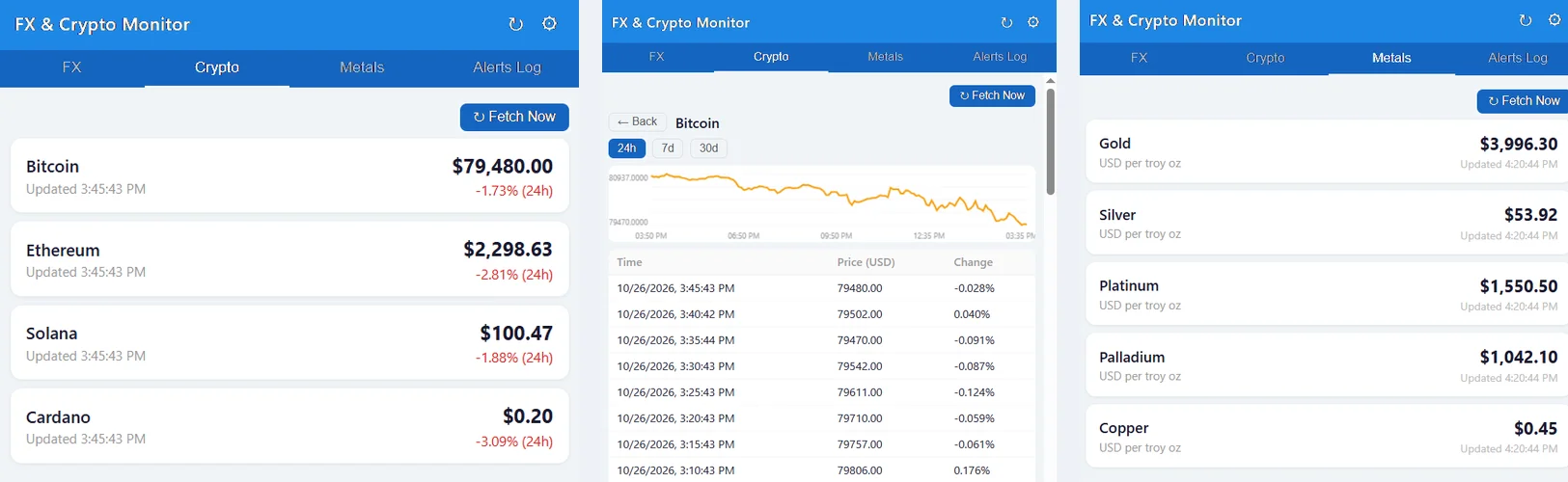
FX and Crypto Monitor: crypto prices, the Bitcoin 24-hour chart with its price history, and metal prices

FX & Crypto Monitor

Free version available

Exchange rates, crypto and metal prices in one popup, with alerts.

  • Your own currency pairs and coins; gold, silver, platinum, palladium and copper
  • 24-hour, 7-day and 30-day charts with the history behind them
  • Alerts when a rate or price passes your level, with an alerts log
  • Export the history to CSV or HTML

For information only, not financial advice. It connects only to its three price services.

Exchange rates from the European Central Bank via Frankfurter (updated daily). Powered by CoinGecko. Metal prices from Metals.Dev.

Ask us about it

How we work

Short loops with the people who will use the software, from the first week.

  1. Find the costly step

    We start from the workflow that costs you the most time or money today.

  2. Prototype in days

    A working version on your own data, not a slide deck.

  3. Connect what you have

    SAP Business One, Google Workspace, Excel, REST APIs, your own systems.

  4. Improve with real users

    Every release follows what your team asks for after using it.

We build for one specific problem, not for an average company, and we use what we build ourselves.

Tell us what slows you down

A short email is enough. We reply within one working day with a first idea, and a demo if one of the Clear products fits.

Email
info@answer42.co.za
Web
answer42.co.za
Regions
Europe · South Africa · Australia · New Zealand

Email us

info@answer42.co.za

Write an email

It helps if you tell us:

  • what you use today (Excel, SAP Business One, Google Workspace...)
  • the step that costs you the most time
  • how many people would use the software

Email us